
|




|
|||||||||||||||||||||||||||||||||||||||||||||||||||||||||
|

Watch the Eclipse, Not Your Camera!
|
||||||||||||||||||||||||||||||||||||||||||||||||||||||||
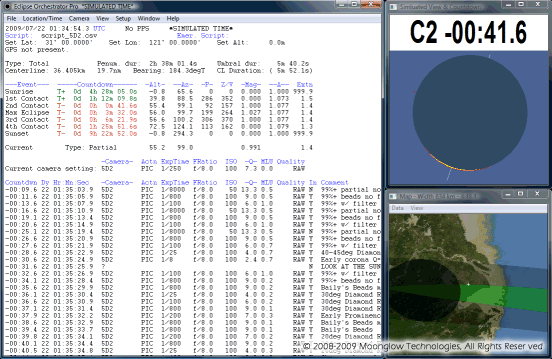 |
| Get detailed information about the event. |
Connect your camera to a laptop with a USB cable (or Firewire cable for certain camera models). Then build a script of exposures, listing when you want each exposure to occur, and with what settings (shutter speed, ISO, aperture, file type). At the appointed time, Eclipse Orchestrator will send commands over the USB cable to the camera to set those settings and trigger the exposure. The images will be saved to the camera's internal memory card, just as if you were there running the camera by hand.
For faster operation, purchase Eclipse Orchestrator Pro, and connect a third-party serial port shutter cable to the camera. The exposure settings still travel over the USB cable, but the shutter trigger command goes over the serial cable, enabling much faster operation.
The software is available in two editions, Free and Pro. Downloading Free allows full checkout of the basic features of the program, without any time limitations. For many users, the Free version is all they will ever need. The Pro edition adds numerous features for power users and professional photographers. Free can be upgraded to Pro at any time, without downloading any additional files - just purchase the serial number and enter it into the software for an instant upgrade!
| Feature comparison: | ||
| Free | Pro | Feature |
|---|---|---|
 |
|
Canon DSLRs |
|
|
Nikon DSLRs |
|
Bulb mode | |
|
Film cameras via electric cable release (not included) | |
|
Serial shutter cable | |
|
Mirror lockup | |
|
Canon/Nikon Live View | |
| about 0.3 | Unlimited | Maximum frames per second |
| 1 | 16 | Simultaneous cameras (experimental, see restrictions) |
| 2 | 10 | Script wizard phenomena |
|
Lunar feature names anywhere on limb profile | |
|
Command line & serial port actions | |
|
Satellite map with animated shadow | |
|
|
GPS time for <1 second accuracy |
|
GPS PPS support for <0.1 second | |
|
Kestrel weather meter support | |
Continue on to read about Features.
For Questions, call 660-747-7782 or email comments@icstars.com